

Track Pregnancy Milestones With a Platform Dashboard

Índice
- What does a track pregnancy milestones platform dashboard include?
- How do you set up your pregnancy milestone dashboard?
- What challenges come up with pregnancy milestone dashboards?
- Best practices for getting the most from your pregnancy dashboard
- Key Takeaways
- Why I think most parents underuse their pregnancy dashboard
- Boy or Girl’s pregnancy tools for milestone tracking
- FAQ
- Recommended
A pregnancy milestone tracking platform dashboard is a digital tool that centralizes all your pregnancy data — developmental milestones, symptom logs, appointments, and prenatal care details — into one user-friendly interface. Before unified dashboards became widely available, expectant parents juggled paper notebooks, scattered apps, and clinic printouts. Today, a well-built pregnancy dashboard replaces that chaos with a single, organized view. Comprehensive platforms now offer week-by-week fetal development insights, contraction timers, and personalized nutrition guidance in one place. Boy or Girl builds on this foundation by adding expert consultations, gender prediction tools, and community support to help you feel confident at every stage.
What does a track pregnancy milestones platform dashboard include?
A pregnancy dashboard is defined by its ability to consolidate all critical tracking functions into one accessible screen. Unified dashboards reduce missed appointments and maternal anxiety linked to fragmented data. That single benefit alone makes the switch from scattered apps worth it.
The core features every effective dashboard should include are:
- Due date and gestational week calculator. Your current week drives every other piece of information on the dashboard. Without it, nothing else is properly contextualized.
- Symptom log with exportable data. You should be able to record symptoms quickly and export a clean summary to share with your care provider.
- Appointment cards with calendar and telehealth integration. Next visit reminders, video call links, and location details belong in one tap.
- Registry and checklist management. Baby gear lists, hospital bag checklists, and gift registries reduce mental load when they live inside your dashboard.
- Emergency contacts and hospital route information. This information needs to be accessible in seconds, not buried in a settings menu.
- AI-driven personalized insights. AI-powered platforms adapt to your individual medical history and risk factors, delivering clinically relevant guidance instead of generic advice.
The user interface matters as much as the feature list. A dashboard cluttered with low-priority data creates stress rather than relieving it. The best designs surface your current gestational age and your most urgent next step the moment you open the app.
Pro Tip: Look for a dashboard that uses color-coded urgency indicators. Color-coded priority systems and one-tap sharing features measurably increase usability and clinician communication.

How do you set up your pregnancy milestone dashboard?
Setting up your dashboard correctly from the start saves you hours of corrections later. Follow these steps to build a reliable system.
-
Choose your single source of truth. Decide on one platform before you enter any data. Experienced parents build no-code dashboards using tools like Airtable, Zapier, and Glide for customized, privacy-respecting tracking. If you prefer a dedicated app, select one that covers milestones, symptoms, and appointments natively.
-
Enter your due date and baseline health data. Your due date anchors the entire dashboard. Add your pre-pregnancy weight, blood type, and any known risk factors at setup so the platform can personalize its guidance from day one.
-
Connect your calendar and appointment reminders. Sync your prenatal appointments directly so the dashboard sends reminders automatically. If your provider offers telehealth, paste the video link into the appointment card.
-
Set up your symptom logging form. Create a simple daily log with fields for nausea, fatigue, pain level, and mood. Keep the form short. One-click actions and gentle nudges reduce cognitive load and promote consistent daily logging.
-
Add your registry links and hospital checklist. Embed your baby registry URL and a hospital bag checklist. Update both as your due date approaches.
-
Enter emergency contacts and your hospital route. Include your OB or midwife, a backup contact, and your preferred hospital address. Some platforms let you save a map link directly in the dashboard.
-
Configure privacy settings and data export options. Privacy-conscious parents prioritize platforms with data export controls and local storage options for sensitive data like birth plans and emergency contacts.
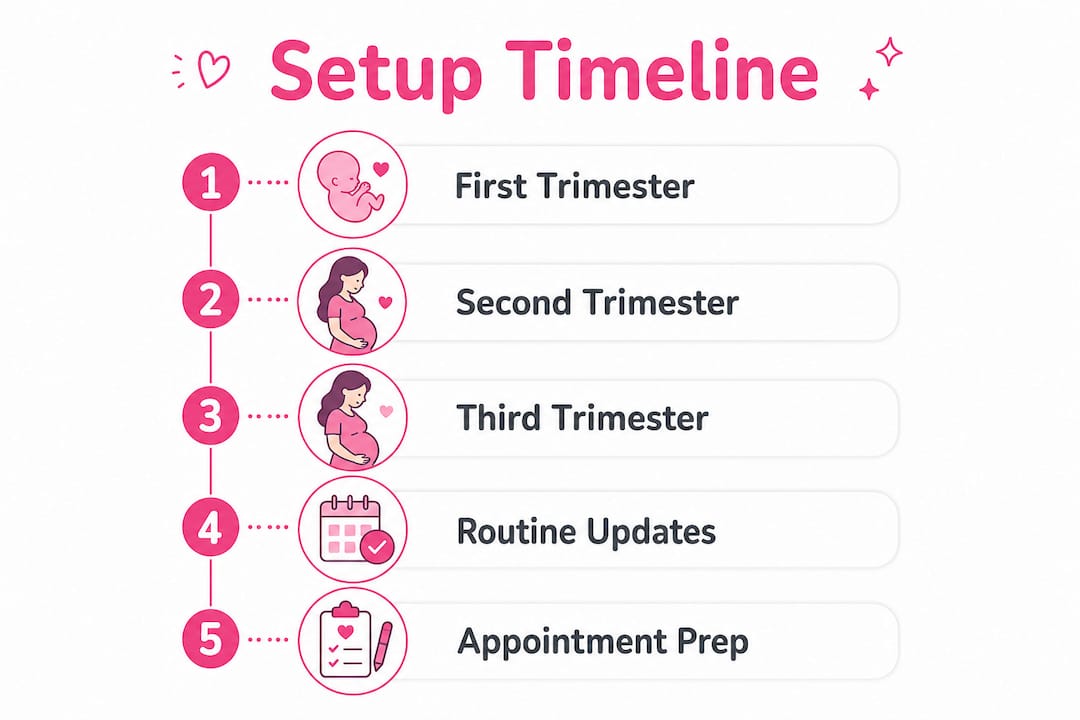
The table below shows which setup steps matter most at each trimester stage.
| Trimester | Priority setup task | Why it matters |
|---|---|---|
| First (weeks 1–13) | Due date, baseline health data, symptom log | Establishes the foundation for all future tracking |
| Second (weeks 14–26) | Appointment cards, registry links, telehealth sync | Prenatal visits increase; registry planning begins |
| Third (weeks 27–40) | Emergency contacts, hospital route, birth plan export | Time-sensitive information must be instantly accessible |
Pro Tip: Export a PDF summary of your symptom log before every prenatal appointment. AI summarization of symptom logs can prepare your clinician with concise reports, making your visit more productive.
What challenges come up with pregnancy milestone dashboards?
Even a well-designed dashboard creates friction if you do not manage it actively. These are the most common problems and how to fix them.
- Data overload. Too many fields and too many notifications push parents to stop logging altogether. Trim your dashboard to the five or six data points that genuinely affect your care decisions.
- Inconsistent logging. Missing a week of symptom data makes trends invisible. Set a daily reminder at the same time each day and keep your entry form to under two minutes.
- Privacy and data security concerns. Not all apps encrypt your data or give you control over sharing. Choose platforms that offer transparent data policies, encryption, and user-controlled sharing settings.
- Calendar sync failures. Telehealth links and appointment times sometimes break when calendars update. Check your sync connection after every app update and re-enter links manually if needed.
- Difficulty sharing with clinicians. Most parents do not know their dashboard can generate a shareable summary. Ask your platform whether it supports PDF export or a shareable link formatted for clinical review.
“The goal of a pregnancy dashboard is not to track everything. It is to surface the right information at the right moment so you can focus on your health and your baby, not on managing data.”
Maintaining motivation is a real challenge, especially in the third trimester when fatigue peaks. Pair your dashboard with a wellness platform like PRYM Wellness to connect your digital tracking with professional health support when you need it most.
Best practices for getting the most from your pregnancy dashboard
Advanced use of a pregnancy milestone tracker goes beyond basic logging. These practices help you get real clinical and emotional value from your dashboard.
-
Use AI summaries to prepare for every appointment. Before each prenatal visit, generate a symptom summary from your log. Hand it to your provider at the start of the appointment. This practice cuts through small talk and focuses the visit on your actual health data.
-
Keep your dashboard focused on critical next steps. Dashboard design research shows that parents lose track of critical tasks in the later stages of pregnancy. Pin your most urgent action item to the top of your view every week.
-
Balance detailed tracking with gentle reminders. Detailed logs are valuable, but daily pressure to record every symptom creates burnout. Use your dashboard’s notification settings to send one gentle nudge per day rather than multiple alerts.
-
Keep emergency info current and accessible. Update your emergency contacts and hospital route every four weeks. Share your dashboard’s emergency view with your partner so they can access it independently.
-
Use your dashboard as a communication tool. Share your week-by-week milestone summary with your partner after each prenatal appointment. Continuous care platforms synchronize pregnancy stages with digital tools to maintain wellness and provider communication through postpartum, making the dashboard useful well beyond delivery.
-
Store sensitive data locally or in encrypted notes. Birth plans, insurance details, and personal health history belong in encrypted storage. Check whether your platform offers local-first storage or end-to-end encryption before entering sensitive information.
Pro Tip: Government-backed platforms like Janani use real-time monitoring dashboards with alerts for high-risk pregnancies. If your pregnancy is high-risk, ask your provider whether a clinically integrated platform is available in your region.
Key Takeaways
A pregnancy milestone tracking platform dashboard works best when it consolidates data, surfaces urgent next steps, and connects directly with your clinical care team.
| Point | Details |
|---|---|
| Centralize all data | Use one platform for milestones, symptoms, appointments, and emergency info to reduce anxiety and missed care. |
| Set up by trimester | Prioritize different dashboard features at each stage, from baseline data in the first trimester to emergency info in the third. |
| Log consistently | Short daily entries with one-click forms build the symptom history your provider needs for informed care decisions. |
| Protect your privacy | Choose platforms with encryption, data export controls, and transparent sharing policies before entering sensitive health data. |
| Share with your care team | Export symptom summaries before every prenatal appointment to make clinical visits more focused and productive. |
Why I think most parents underuse their pregnancy dashboard
At Boy or Girl, we have seen a consistent pattern: expectant parents set up a dashboard in the first trimester with real enthusiasm, then gradually stop using it by week 28. The reason is almost never the platform. It is the design expectation. Parents expect the dashboard to manage itself. It does not.
The real value of a pregnancy milestone tracker shows up when you treat it as a communication tool, not just a log. Before unified dashboards existed, pregnancy data lived in three places: a paper notebook, a clinic file, and a parent’s memory. None of those sources talked to each other. A well-used dashboard fixes that fragmentation permanently.
Privacy-first design matters more than most parents realize at the start. By the third trimester, your dashboard contains birth plan details, insurance information, and emergency contacts. That data deserves the same protection as your financial records. Choose platforms that give you full control over what gets shared and with whom.
The future of pregnancy dashboards points toward wearable integration and continuous AI monitoring. Platforms that synchronize with wearable devices will soon deliver real-time fetal movement alerts and maternal heart rate trends directly to your dashboard view. That shift will make the dashboard less of a logging tool and more of a live health companion. The parents who build good dashboard habits now will be ready for that transition.
Boy or Girl’s pregnancy tools for milestone tracking
Expectant parents who want a single platform for milestone tracking, personalized guidance, and community support will find everything they need at Boy or Girl.
Boy or Girl combines week-by-week pregnancy milestones with expert consultations, tailored diet plans, and the XY Method chromosomal prediction tool. The platform is built for expectant mothers who want clear, personalized information without having to piece it together from multiple sources. Privacy settings give you full control over your data, and the community forums connect you with other parents at the same stage. Whether you are tracking your first pregnancy or your third, Boy or Girl gives you a supportive, organized space to manage every milestone with confidence.
FAQ
What is a pregnancy milestone tracking dashboard?
A pregnancy milestone tracking dashboard is a digital platform that consolidates fetal development data, symptom logs, prenatal appointments, and emergency contacts into one interface. It replaces scattered apps and paper notes with a single organized view.
How do I choose the right pregnancy dashboard platform?
Choose a platform that covers your gestational week, symptom logging, appointment reminders, and data export in one place. Prioritize platforms with encryption and transparent data-sharing policies to protect sensitive health information.
Can a pregnancy dashboard help at prenatal appointments?
Yes. AI summarization of symptom logs produces concise reports your clinician can review at the start of each visit, making appointments more focused and clinically productive.
When should I start using a pregnancy milestone dashboard?
Start at the beginning of your first trimester. Entering your due date and baseline health data early gives the platform enough context to personalize its guidance from week one onward.
Is my pregnancy data safe on a digital dashboard?
Safety depends on the platform. Choose tools that offer end-to-end encryption, local storage options for sensitive data, and clear policies on who can access your information and under what conditions.
Visita nuestras redes sociales
Recommended
What Is a Pregnancy Smoothie Diet? Your Prenatal Guide

Pregnancy Meal Planning Best Practices for New Moms

Pregnancy Nesting Instinct: Guide for First-Time Moms

Why Maternal Instinct Gender Prediction Works

Pregnancy Announcement Timing Examples: A Real Guide

Why Mobile-First Design Suits Pregnancy Platforms